What sort of printer cables do you prefer? This is surprising, but the reality is that many printer cables exist on the market. Therefore, you need to choose wisely.
Gone are the days of multi-connectors. USB is the pinnacle of technology The USB These days, it is uncommon to see an electronic device without a USB.
One particular type of printer cable is USB printer cables. USB printer cables work much better if you know how! How does it work? How To Get Custom USB Printer Cable?
Everything you need to know to get it right is in this article — just read!
I. Introduction
1. The Importance of USB Printer Cables
In modern office and production environments, USB printer cables serve as the critical link between computers and printers. They not only transmit large volumes of print data (typically faster than parallel port transfers) but also provide essential power support. Selecting the right USB cable ensures more stable printing performance, lower failure rates, and higher operational efficiency.
2. Purpose and Structure Overview
This document serves as a comprehensive reference guide for USB printer cables. From foundational concepts to technical specifications, and from market selection to customization recommendations, we address all critical considerations you may encounter during procurement and usage.
II. What is a USB Printer Cable?
1. Definition of a USB Printer Cable
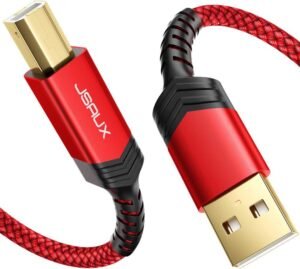
A USB printer cable is a data signal transmission cable specifically designed to connect a computer (PC) to a printer. It utilizes the Universal Serial Bus (USB) standard to enable efficient data transfer and device power delivery.
2. Basic Structure of a USB Printer Cable
A standard USB printer cable typically consists of the following components:
- Conductors: Typically made of high-purity copper cores responsible for signal transmission.
- Insulation and Shielding: Covered in PVC or other materials, potentially featuring an internal shielding layer to prevent electromagnetic interference.
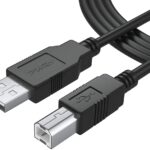
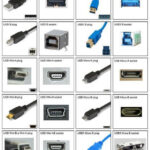
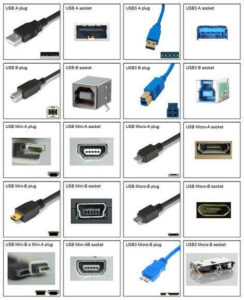
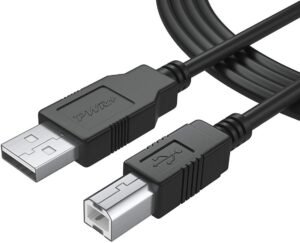
- Connectors: One end features a rectangular Type A male connector (connecting to the computer), while the other end has a square Type B male connector (connecting to the printer). Some newer devices utilize Type C interfaces.
3. USB Printer Cable Functionality
USB cables transmit data via four conductors: two power lines (Vbus and GND), one D+ signal line, and one D- signal line. They support Plug and Play and Hot Plug functionality, enabling automatic driver recognition and installation within operating systems without additional configuration.
III. Multiple Connection Methods for USB Printer Cables
1. USB-A to USB-B Connection
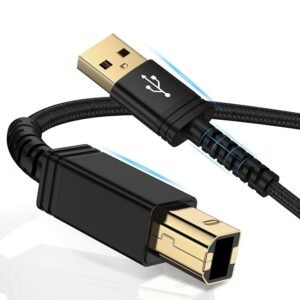
This is the most traditional and common configuration: one end features a rectangular USB-A connector (connecting to the computer), while the other end has a square USB-B connector (connecting to the printer). This type is widely used for inkjet and laser printers in home and office settings.
2. USB-C Connection
With technological advancements, an increasing number of printers support USB Type-C ports. This reversible connector supports higher power delivery (USB PD), making it suitable for high-performance industrial printers or multifunction devices.
3. Other Connection Methods (e.g., Micro USB, Mini USB)
Some older or compact printers (like portable label makers) may still retain Micro USB or Mini USB ports. Though gradually phased out, they remain necessary in specific scenarios.
4. Application Scenarios for Different Connectivity Options
- Type A to B: Standard desktop printers, office equipment.
- Type C: New multifunction devices, high-end industrial equipment.
- Micro/Mini USB: Compact thermal printers, label printers.
IV. Comparing USB Printer Cables with Other Types of Printer Cable
1. Overview of USB Printer Cables vs Parallel Cables
- Transfer Speed: USB transferring is much faster compared to old parallel speed (parallel port).
- Ease of Use: USB allows both hot-plugging and plug-and-play, while parallel ports typically need the computer to be rebooted or for the port to be manually configured.
- Form Factor: USB cables tend to be thinner, more flexible, and have smaller connectors.
2. USB Printer Cables vs Serial Cables Comparison
- Versatility: USBis the current mainstream standard, while serial cables (RS232) are gradually becoming obsolete.
- Function: USB is both data transporter and power supplier, while the former serial ports are mainly to transfer low speed data.
3. Pros and Cons of USB Printer Cables
- Pros: Sacco, high transmission speed, stable performance in the excellent, a strong compatibility, plug and play.
- Disadvantages: Sensitive to cable quality; Poor cables could lead data packets or print quality loss.
V. How to Customize Your USB Printer Cable
1. Necessity and Benefits of Customization
For specific industrial environments or specialized applications, off-the-shelf cables may fall short. Customization addresses the following challenges:
- Length: Standard cables typically measure 1-2 meters; custom lengths accommodate extended requirements.
- Interference Resistance: Industrial settings may demand enhanced shielding or specialized wire gauges.
- Appearance: Specific colors or labeling aid field management.
2. Customization Options (Length, Color, Material, etc.)
- Length: Ranges from several centimeters to 10 meters; typically recommended not exceeding 5 meters to ensure signal quality.
- Color: Options include black, white, blue, etc., with custom printing available for specific markings.
- Material: PVC, braided sheath, pure copper conductors, etc.
3. Selecting Suitable Suppliers and Considerations
- Specification Verification: Ensure cables meet USB 2.0 or higher standards and have undergone electromagnetic compatibility (EMC) testing.
- Interface Standards: Confirm interface type (Type A/B/C) and pin definitions match.
- Quality Assurance: Choose products with certifications like UL or CE to ensure safety and durability.
VI. Conclusion
1. Key Considerations for USB Printer Cables
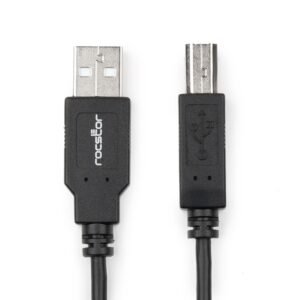
USB printer cables are not merely connection tools but critical factors affecting printer performance. By understanding different interface types (Type A/B/C), technical specifications (USB 2.0/3.0), and customization options, you can avoid common connection issues such as black screens, paper jams, and printer recognition failures.
2. Future Trends Outlook
With the widespread adoption of USB-C interfaces and advancements in wireless printing technology, traditional USB-A to B cables are gradually being replaced by more efficient solutions. However, within the current printer ecosystem, standard USB printer cables remain the most reliable and widely accessible connectivity option.
Kontak Jinhai today to get your project’s custom-made USB printer cable.